


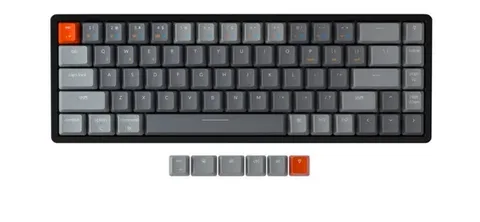
For years, mechanical keyboards have been praised for their satisfying tactile feedback and durability. But what if you love that mechanical feel without the loud click-clack disrupting your focus—or your neighbors’? Enter the world of silent but satisfying mechanical keyboards. In this article, we bring you quiet small mechanical keyboards reviewed—perfect for compact workspaces, minimal setups, and silent productivity.
Why Choose a Quiet Small Mechanical Keyboard?
Mechanical keyboards are typically associated with noisy switches, but not all switches are created equal. Today’s market offers a variety of quiet switch options—like Cherry MX Silent Reds, Gateron Silent Browns, and Topre switches—that provide tactile feedback without the noise.
Small mechanical keyboards, such as 60%, 65%, and TKL (Tenkeyless) layouts, offer space-saving advantages while maintaining full functionality for most users. Combining silence with compact design makes these keyboards ideal for:
- Shared workspaces
- Home offices
- Gaming without disturbing others
- Travel-friendly setups
Top Picks: Silent but Satisfying Models
Here are a few quiet small mechanical keyboards reviewed and rated highly by both professionals and enthusiasts:
1. Keychron K6 (Hot-Swappable with Gateron Silent Browns)
A popular 65% layout that balances size and performance. The hot-swappable feature lets users easily switch to silent switches.
Pros:
- Bluetooth and wired connectivity
- Mac/Windows compatibility
- Affordable pricing
Cons:
- Slightly bulky for a 65% keyboard
2. Leopold FC660C (Topre Switches)
This premium keyboard uses electro-capacitive Topre switches, which are both quiet and incredibly smooth.
Pros:
- Superb build quality
- Nearly silent keypresses
- Excellent typing feel
Cons:
- Higher price point
- Limited availability
3. Ducky One 2 Mini (Custom Silent Reds)
A favorite among gamers, this 60% keyboard can be customized with silent linear switches for a stealthier experience.
Pros:
- Compact and stylish
- High-quality PBT keycaps
- Custom switch support
Cons:
- No dedicated arrow keys
- Requires function-layer learning
Tips for Making Your Keyboard Quieter
Even if your current board isn’t silent, there are ways to dampen the noise:
- Switch to silent mechanical switches
- Add O-rings to keycaps
- Install dampening foam inside the case
- Use a soft desk mat
These modifications can significantly reduce typing noise while maintaining the mechanical feel.
Conclusion
The world of mechanical keyboards is no longer limited to noisy clacks and bulky designs. With silent but satisfying: quiet small mechanical keyboard reviewed, it’s clear that you don’t have to choose between functionality and silence. Whether you’re a coder burning the midnight oil or a student in a shared dorm, these compact and quiet solutions offer the best of both worlds.
